
What does this screen do?
As certificate lifetimes get shorter, tracking every site on its own calendar gets harder. If one is forgotten, the site does not open. NetSSL takes over this work completely. A certificate is obtained automatically for every address you add and renewed before it expires. The host page and the hosts list show how many more days each site's certificate is valid.
When do you need wildcard SSL?
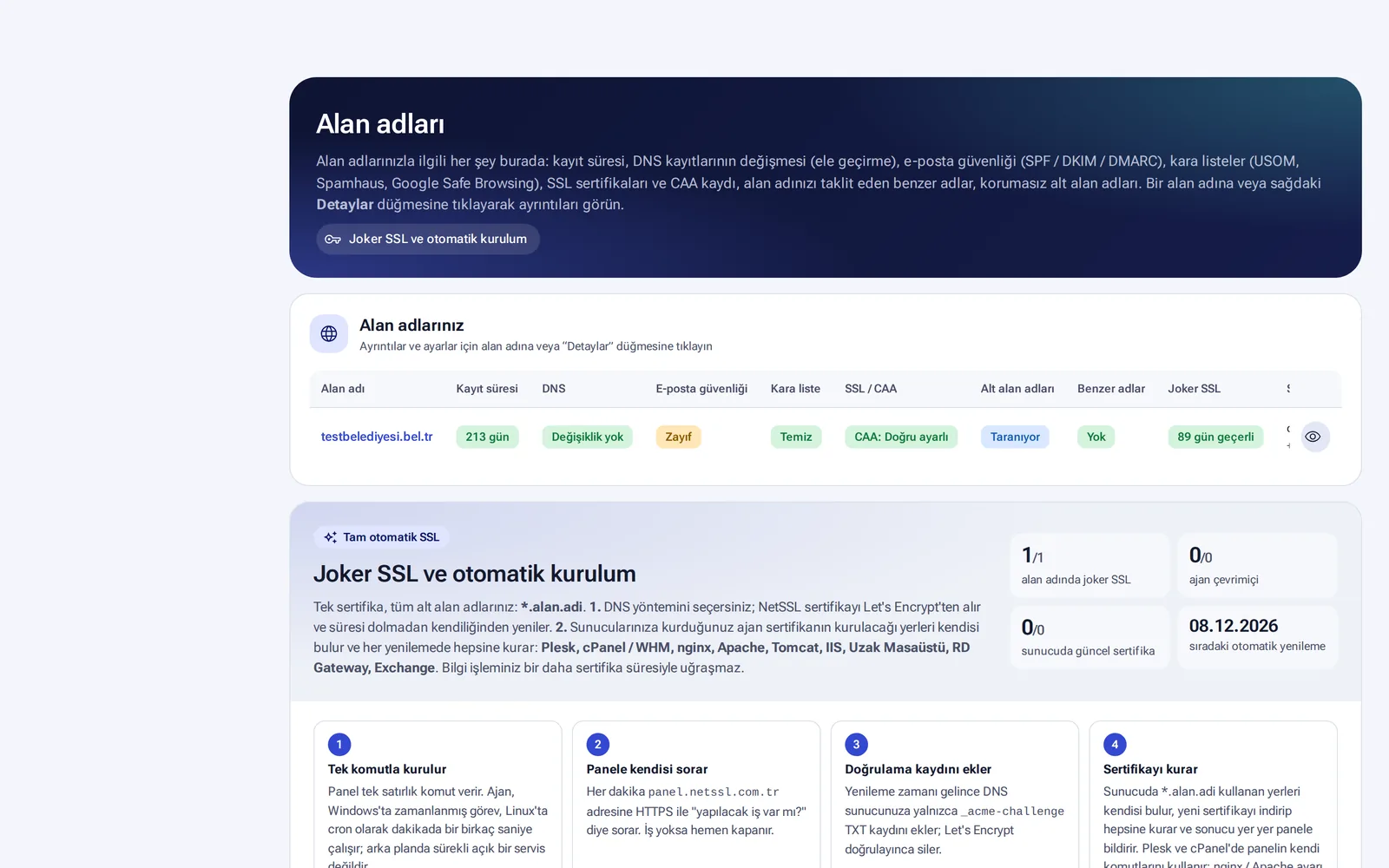
Your servers that do not go through NetSSL also need certificates. Examples are the electronic document management system (EDMS), Exchange, Remote Desktop and internal portals. For these you can get a wildcard certificate (*.kurum.bel.tr). A single certificate covers all subdomains of your domain.
Get the wildcard certificate
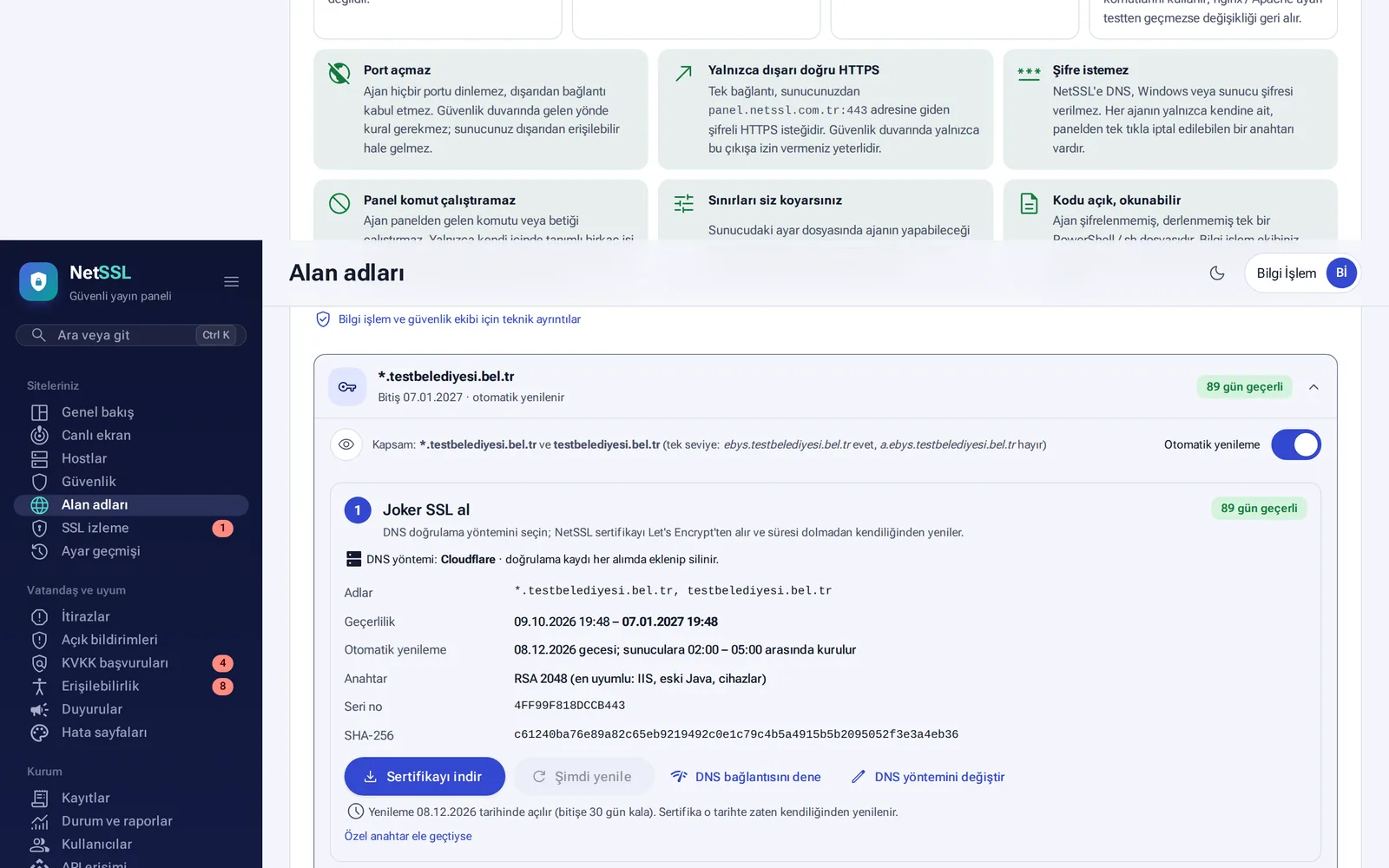
- On the Your sites → Domains page, open the wildcard SSL card of your domain.
- Choose the DNS method (for example Cloudflare). Only an
_acme-challengeTXT record is added for validation, and it is deleted when validation is complete. - The certificate is issued by Let's Encrypt. The key is RSA 2048, so it also works with older Java versions and devices.
- When Automatic renewal is on, the certificate renews itself 30 days before it expires.
You can get the certificate in PEM, PFX or JKS format with the Download certificate button. The Renew now and Test DNS connection buttons are on the same card. Certificate files are given only to authorized users who are logged in to the panel.
Automatic deployment to your servers
When you install a small agent on your organization's servers, the certificate is installed and renewed automatically at night, between 02:00–05:00. If the certificate on a server has 3 days left before it expires, the new one is installed without waiting.
- Use Add server to give the server a name and choose its operating system.
- Run the command that the panel gives you once on the server (as root on Linux, in an administrator PowerShell on Windows).
- Within a minute, the agent finds the places where the certificate should be installed. You can turn off any place you do not want with its switch.
| Server | Where the agent installs the certificate |
|---|---|
| Plesk | Sites and subdomains. If in scope, also the Plesk panel (:8443) and the email server |
| cPanel / WHM | Sites, subdomains and addon domains. Also cPanel (:2083), WHM (:2087), webmail, Exim and Dovecot |
| nginx / Apache | Sites with HTTPS enabled. A backup is taken first, and the change is rolled back if the configuration test fails |
| Tomcat | The PKCS#12, JKS or PEM certificate in server.xml |
| Windows | IIS, Remote Desktop (RDP), RD Gateway, Exchange |
| Other | Node.js, Python and Java services. A PEM folder for HAProxy and Postfix |
The agent opens no ports. It only connects outbound to the panel over HTTPS. It does not ask for a password. Each agent has its own key, which you can revoke with one click. The panel cannot run commands through the agent. It can only have the agent add a TXT record and install a certificate. The limits are set by a configuration file on the server, and the panel cannot change that file. The agent is a single PowerShell or sh file, and its code is open.
Frequently asked questions
Does the wildcard certificate also cover sub-subdomains?
No. *.kurum.bel.tr covers a single level. ebys.kurum.bel.tr is covered, but a.ebys.kurum.bel.tr is not.
How do we get the certificate into our own software?
You can download the certificate from the panel or fetch the fullchain.pem file through the signed API.
What happens if we add a new site to the server?
The agent finds the new site or subdomain by itself and installs the certificate on it in the next installation run.