
What does this screen do?
When a researcher or a body such as USOM (Türkiye's national cyber incident response center) finds a vulnerability on your site, they look for a way to reach you. The standard address for this is the /.well-known/security.txt file (RFC 9116). NetSSL publishes this file on each of your sites. The file points to a report form specific to your organization.
The report form is open to everyone. Once the reporter verifies their email address, the report arrives in your panel and you are notified. You review the report and enter its severity and status. Each time the status changes, the reporter receives an email.
You reach this screen from the Citizens and compliance → Vulnerability reports menu.
When should you use it?
- When you want to publish a security.txt file on your sites.
- When you want to review a vulnerability reported by a researcher and keep a record of it.
- When you want to announce when you will reply to reporters and keep track of that commitment.
- When you want to tell the reporter that the vulnerability has been fixed.
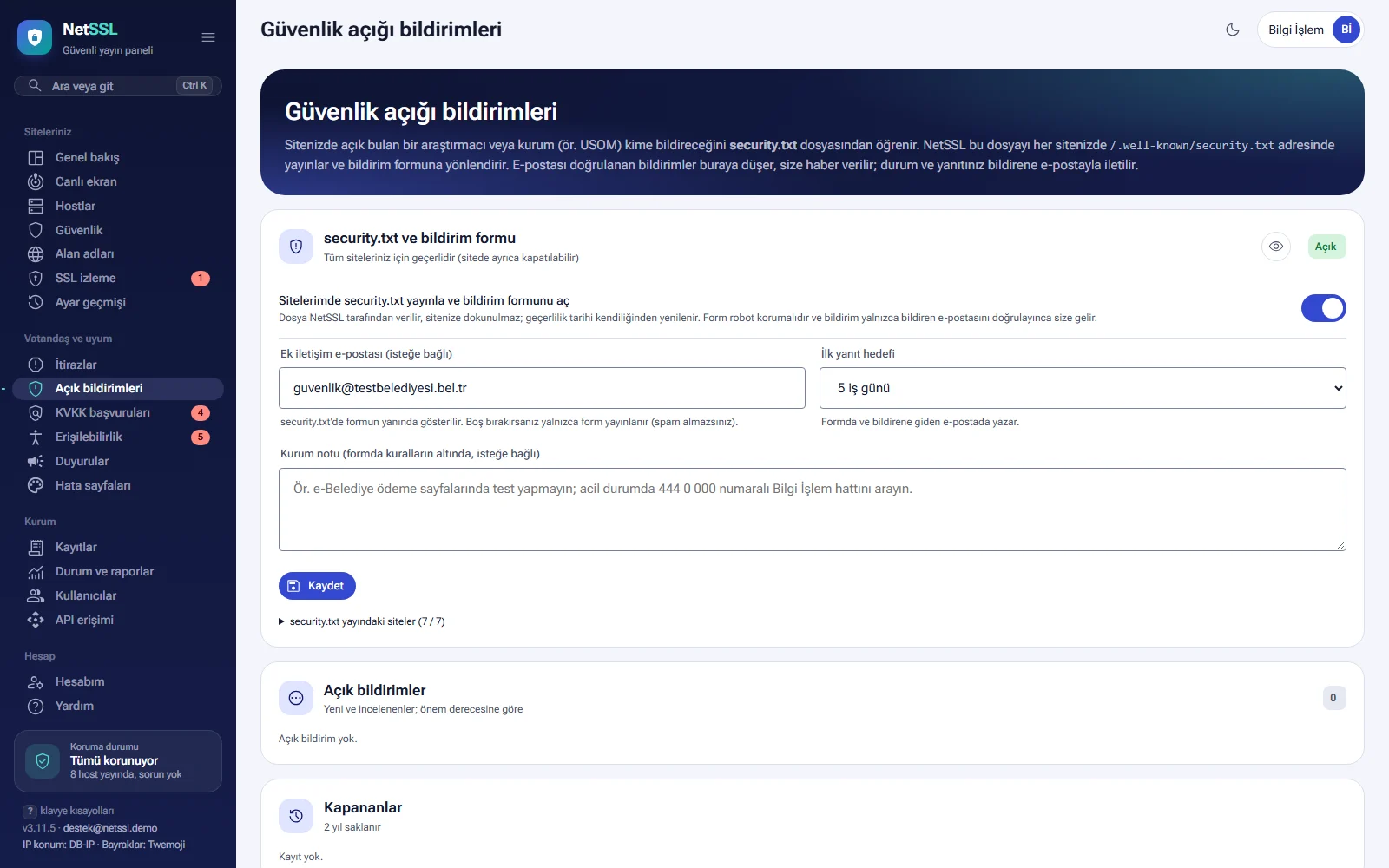
Turn on security.txt and the report form
The setting in the security.txt and report form section applies to all your sites. The organization administrator changes this setting.
- Turn on the Publish security.txt on my sites and open the report form switch.
- If you want, enter an Additional contact email. This address is shown next to the form in security.txt. If you leave it empty, only the form is published and you do not get spam.
- Choose a First response target: 3, 5, 10 or 15 business days. This period appears on the form and in the email sent to the reporter.
- If you want, enter an Organization note. The note appears on the form below the rules. For example, you can list pages that must not be tested or a number to call in an emergency.
- Click the Save button.
The Sites where security.txt is live list shows which sites the file is published on. The site setting link on each row opens that site's setting.
The file is served by NetSSL and does not go to your target server. Your site is not touched. The expiry date in the file (Expires) is less than one year ahead, and the file is renewed automatically before that date. The old /security.txt address redirects to the new address.
Turning it on or off for a single site
Each site's setting is on the Vulnerability reports (security.txt) card on the host's Maintenance and notifications page. The card shows the content of the file published on the site. With the switch, you can turn the file off for that site only.
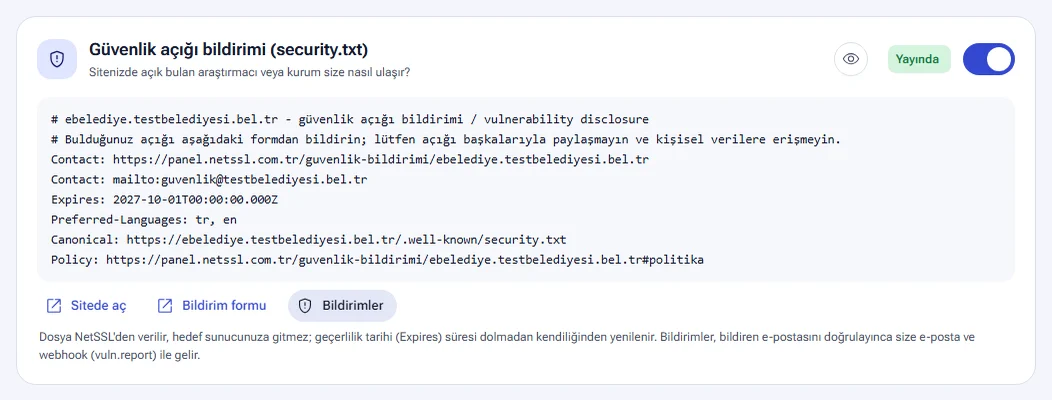
The file contains these lines:
| Line | Content |
|---|---|
Contact |
The site's report form and the additional contact email, if any |
Expires |
The date until which the file is valid |
Preferred-Languages |
Turkish and English |
Canonical |
The file's official address on the site |
Policy |
The rules section of the form |
On the card, Open on site opens the file, Report form opens the form and Reports opens the list in the panel.
The form the researcher sees
The form opens at the /guvenlik-bildirimi/ address followed by the site's name. The form begins with the Rules.
- Testing should go only as far as needed to show the vulnerability. Personal data must not be accessed, downloaded, changed or deleted.
- Tests that slow down the service, social engineering and physical attacks are not allowed.
- The vulnerability must not be shared with others until it is fixed. The organization's first response target is stated here.
- Reports made in good faith are received with thanks. The form is not a bug bounty program.
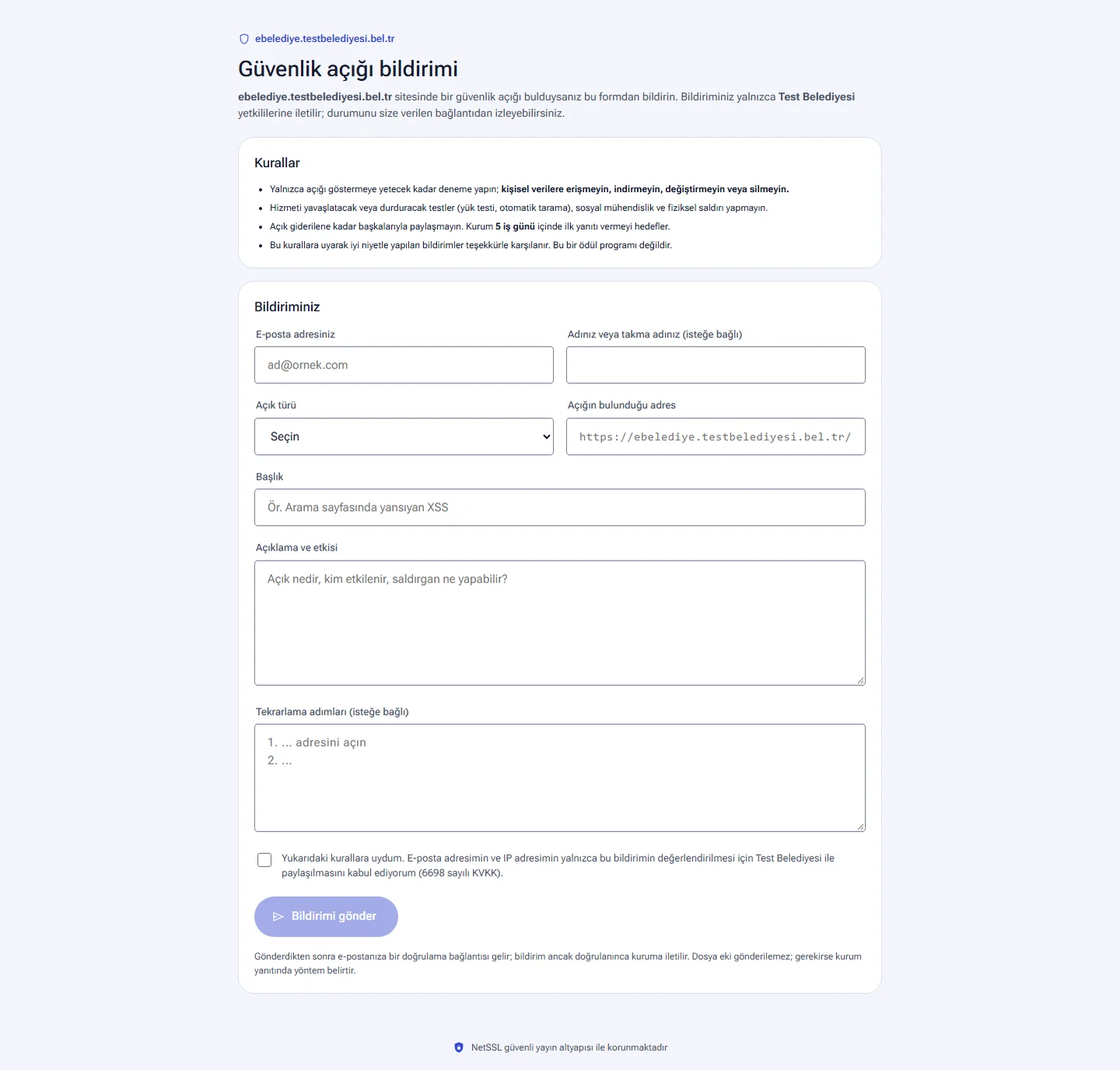
The researcher enters their email address, their name (optional), the Vulnerability type, the address where the vulnerability is, a title, a description and the steps to reproduce it (optional). The vulnerability types are:
- Cross-site scripting (XSS)
- SQL injection
- Unauthorized access / authentication bypass
- Access to another person's data (IDOR)
- Personal data or information disclosure
- Code execution / malicious file upload
- Misconfiguration (open directory, backup file, default password)
- Session / CSRF issue
- Other
The form accepts only addresses that belong to that site's domain. The researcher confirms that they followed the rules and agrees that their email and IP address are shared with the organization. File attachments cannot be sent. If needed, the organization names a method in its reply.
The form is protected against bot submissions. An address that sends many reports in a short time is blocked temporarily. A submitted report is not shown to the organization until the researcher clicks the verification link in their email. Reports that are not verified within 48 hours are deleted.
How does a report reach the panel?
Once the researcher verifies their email, the report gets a GA- number and appears in the Open reports list. At the same time you receive an email. If webhook (vuln.report), Telegram and SMS notifications are turned on, they are sent too. The number of open reports also appears in the Needs attention list and on the menu counter.
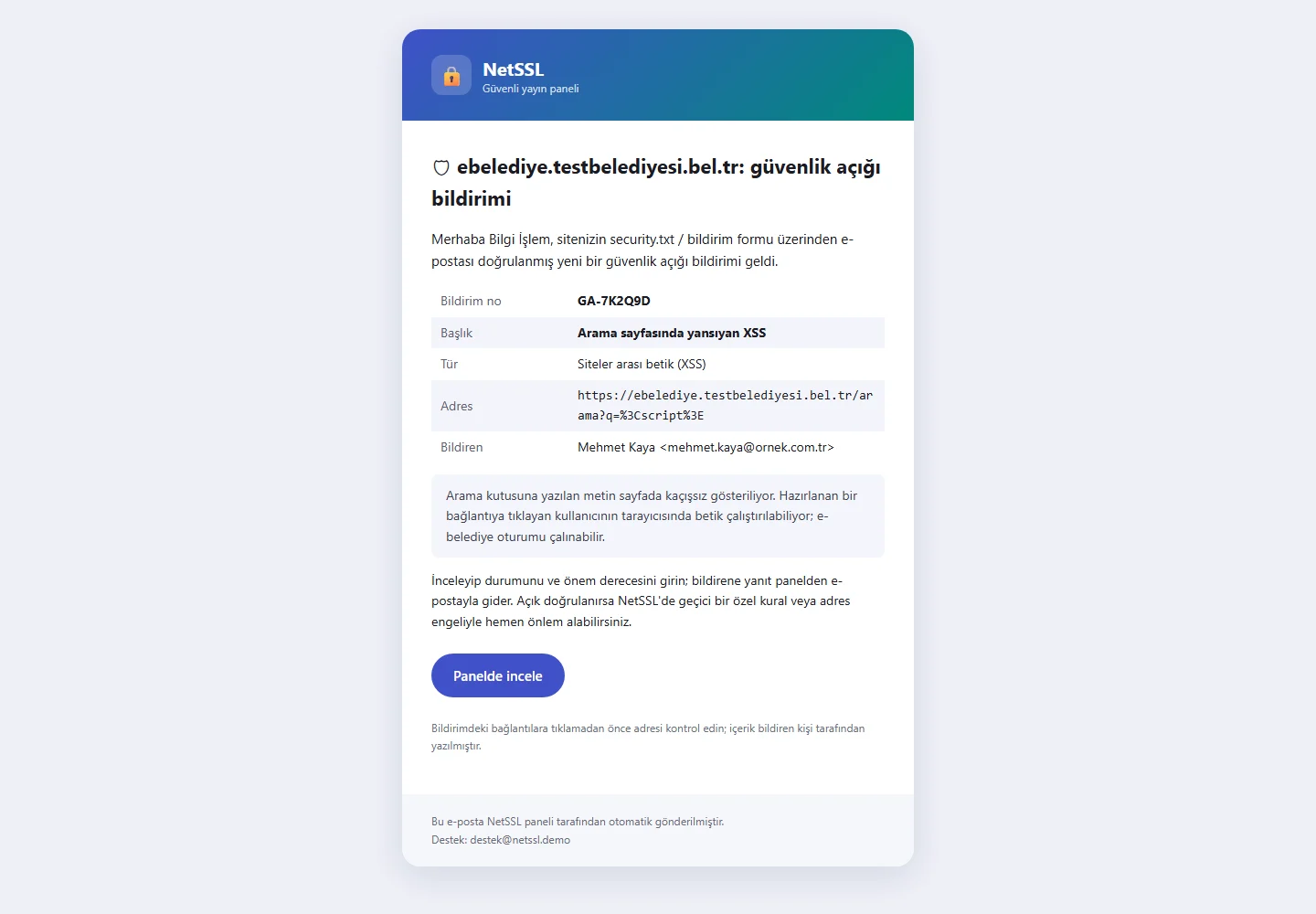
Evaluating a report
The Open reports list sorts new reports and reports under review by severity. Each report shows the site, the vulnerability type, the reporter's name and email, the IP address, the vulnerable address, the description, the steps to reproduce and the correspondence.
- Read the report and verify the vulnerability.
- Choose the Status: New, Under review, Fixed, Not a vulnerability or Already reported.
- Choose the Severity: Critical, High, Medium, Low or Info.
- If needed, write a Reply to reporter. When you close a report as “not a vulnerability” or “already reported”, you must write a short explanation.
- Click the Save button.
If the status changes or you write a reply, the reporter receives an email. When you mark a report Fixed, the reporter can check the fix themselves. Changing the status requires site editing permission. Closed reports move to the Closed list and are kept for 2 years.
The links in a report were written by the reporter. Check the address before you open it. If the vulnerability is confirmed, you can protect the site in NetSSL with a custom rule or an address block until it is fixed. Details are in the Attack protection guide.
The reporter's tracking page
After verification, the reporter gets a tracking page. The page shows the site, the vulnerability type, the status and the organization's severity assessment. The organization's replies appear in the correspondence section. While the report is open, the reporter can add more information or questions here. Their message is added to the report's correspondence in the panel.
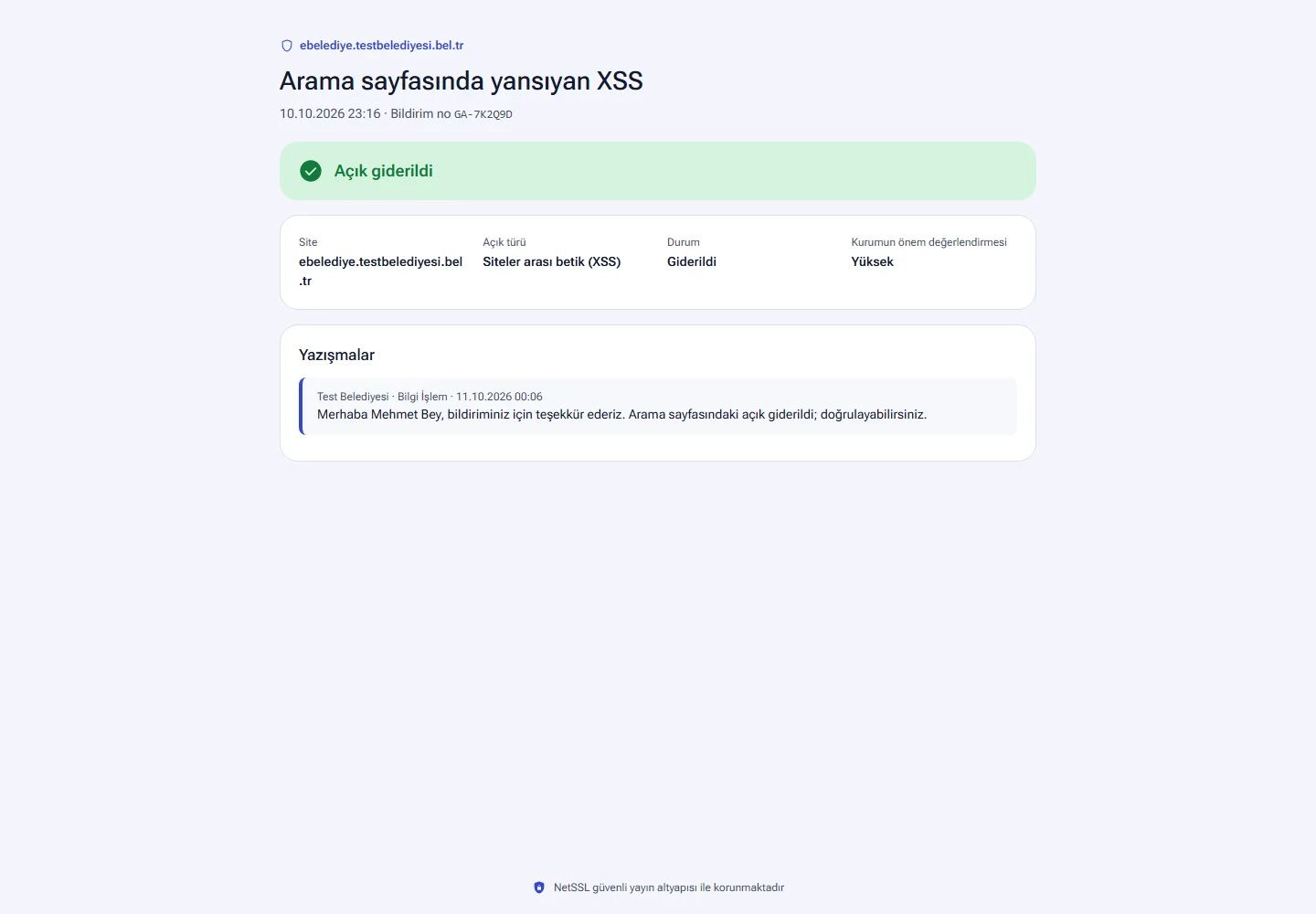
The eye button in this section shows every step with sample data: the security.txt file, the report form, the verification email, the email you receive, the update sent to the reporter and the tracking page.
Frequently asked questions
Do we need to create a file on our site for security.txt?
No. NetSSL publishes the file, and the request does not go to your target server. Even if your site already has a security.txt file, visitors get NetSSL's file.
What happens if we do not enter an additional contact email?
security.txt shows only the report form. This way your email address does not end up on spam lists. Reports still arrive through the form.
Can we see unverified reports?
No. A report does not appear in the panel until the researcher verifies their email. This rule filters out fake and automated submissions. An unverified report is deleted after 48 hours.
Is this a bug bounty program?
No. The form rules also state that this is not a bug bounty program. Good-faith reports are received with thanks.