Web security · for municipalities and organizations

NetSSL Web Security

All of your organization's sites are protected from a single panel. SSL certificates are obtained and renewed automatically, attacks stop before they reach your site, and every request is logged in line with Law 5651. Your site stays on your own server. Only the DNS record changes.
  • Your site stays where it is
  • Logs compliant with Law 5651 and KVKK
  • Data stays in our own facility in Ankara
panel.netssl.com.tr
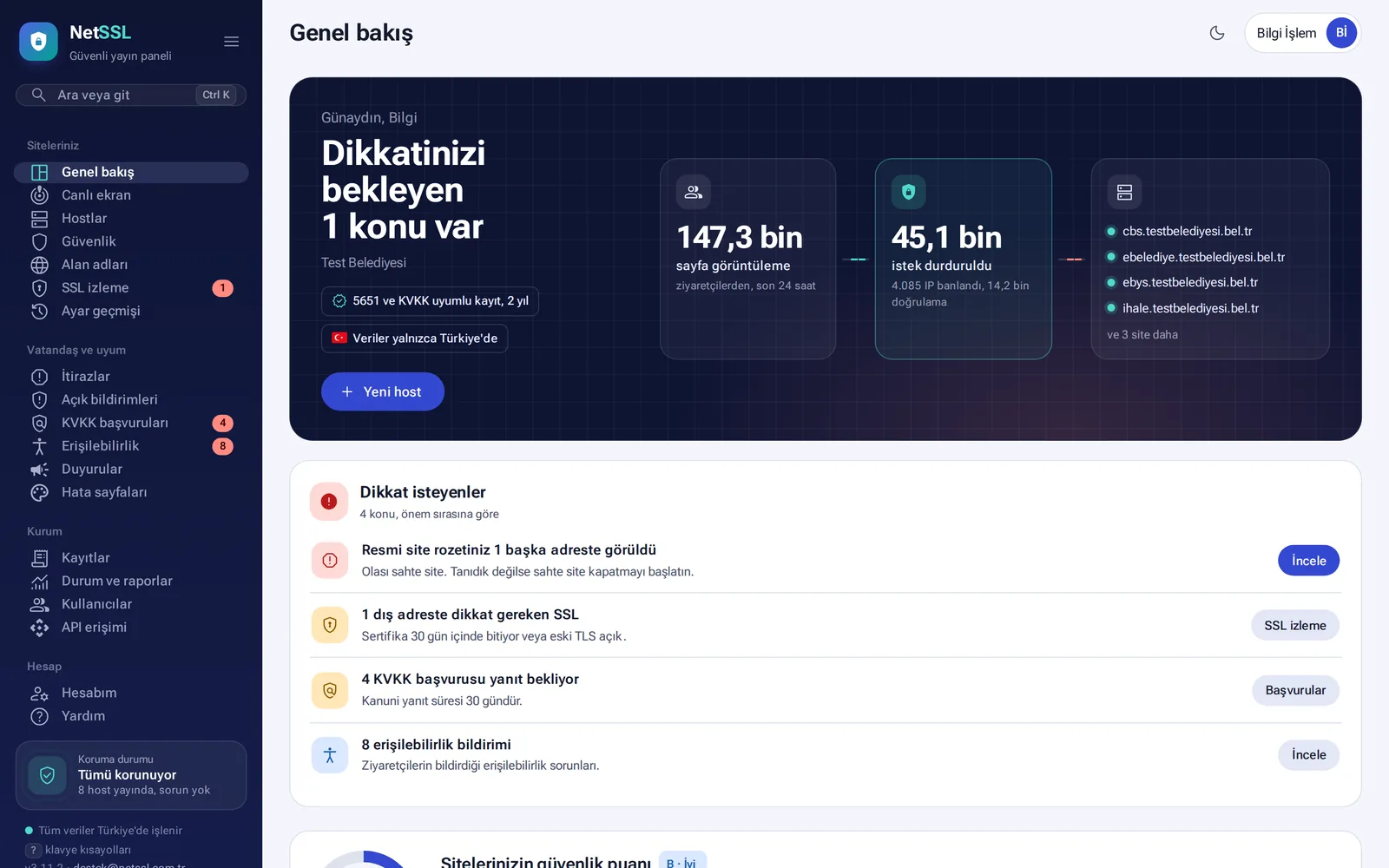
NetSSL panel overview: sites, the last 24 hours and attacks stopped
Attack StoppedSQL injection · never reached the site
SSL Valid for 89 DaysRenewed before it expires
Automatic SSLWildcard SSL, overnight install on servers
Attack ProtectionUSOM list, virtual patching
Law 5651-Compliant Access Logs2 years, daily timestamp
KVKK and AccessibilityRequest tracking, toolbar
In brief

What is NetSSL?

NetSSL is a security and publishing layer that runs in front of websites. Visitors reach the site through NetSSL. On the way, the connection is encrypted with SSL, attacks are stopped and every request is logged in line with Law No. 5651.

It is designed for municipalities, public institutions and companies. Traffic and logs are processed and stored in our own facility in Ankara and are not transferred abroad.

What you needA single DNS record, usually a CNAME. Your site, your server and your software stay as they are.
Who uses itMunicipalities, provincial directorates, universities, hospitals, chambers and associations, and companies that run applications on their own servers.
How long it takesOnce the DNS record is visible, SSL is obtained and the site goes live. This usually takes a few minutes.
How Does It Work?

The Visitor, NetSSL and Your Server

NetSSL sits in front of your site. Your site, your server and your software stay as they are.

VisitorTypes your site's address
NetSSLOur own facility in Ankara SSL encryptionSecurity rulesLaw 5651 logging
Your serverReceives only clean requests

Add the Site to the Panel

Enter the site's address and your target server. You can add many sites in bulk.

Change the DNS Record

Add the single record the panel shows to your domain. The panel checks the record itself.

Your Site Is Live

Once the record is visible, SSL is obtained and protection and logging begin. If you like, we can do the setup together with you on screen.

NetSSL Features
Main Sections of the Panel

Tools That Bring Your IT Team's Work into One Panel

Each protection has its own switch for each site. The preview next to each setting shows in advance what visitors will see.

01 · SSL

No More Expired Certificates and Sites That Won't Open

The certificate for every address you add is obtained automatically and renewed before it expires. A small agent installs the wildcard certificate on your organization's Windows and Linux servers during the night. Certificates of addresses that do not go through NetSSL, such as a VPN or a mail server, are monitored too, and you are notified before they expire.
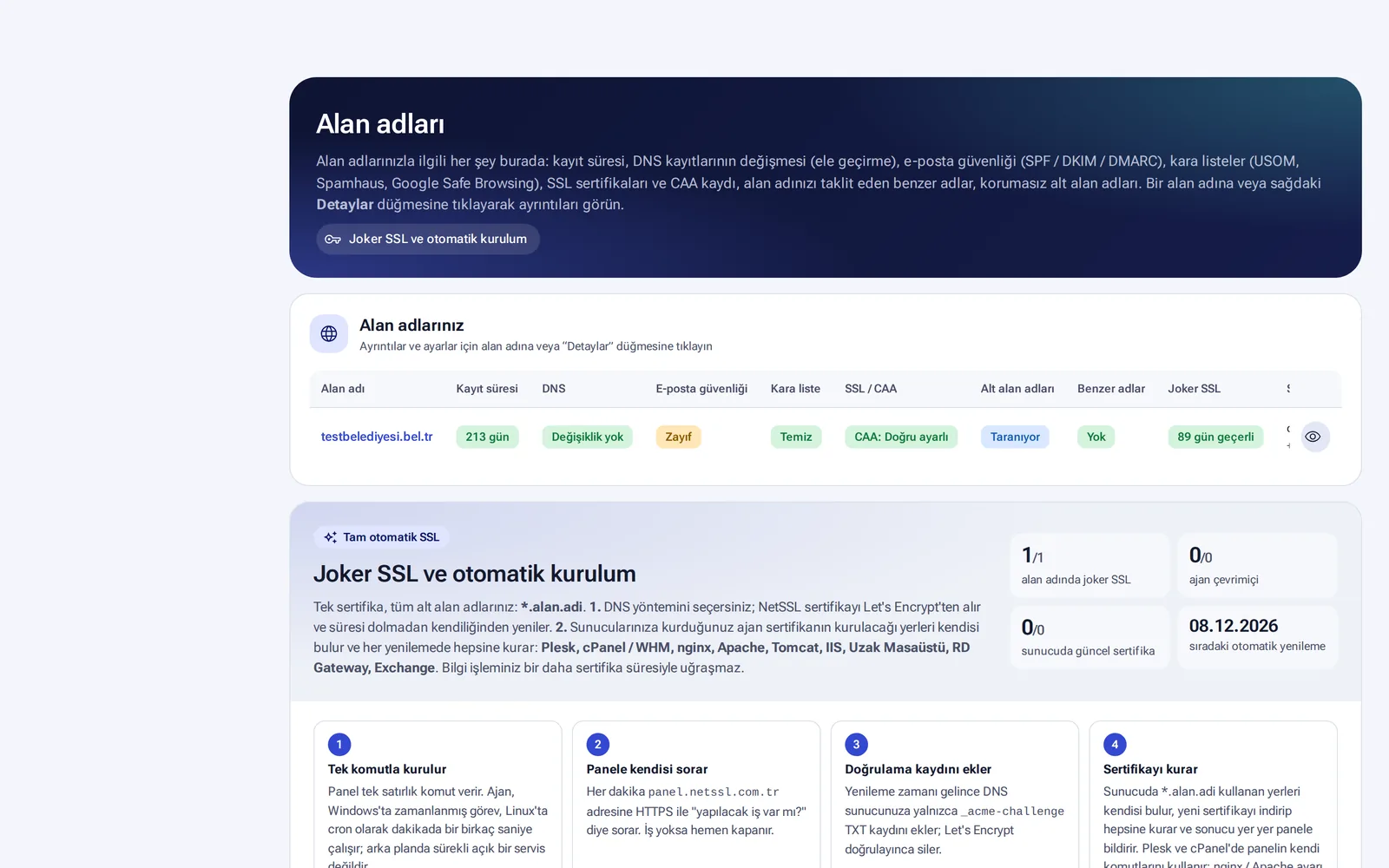
Automatic SSL for every site Wildcard SSL (*.kurum.bel.tr) Overnight install on servers VPN and mail certificate tracking
Automatic SSL guide
Screen for wildcard SSL and automatic installation on servers
Most Used by Organizations
02 · ATTACK PROTECTION

Attacks Stop Before They Reach Your Site

Requests are inspected before they reach your server. NetSSL stops SQL injection, file scanning, brute-force login attempts, malicious bots and sources on the malicious address list of USOM, Türkiye's national cyber incident response center. An address that attacks one organization is also stopped at the other organizations on NetSSL. You can watch a new rule in test mode first, without blocking anyone.
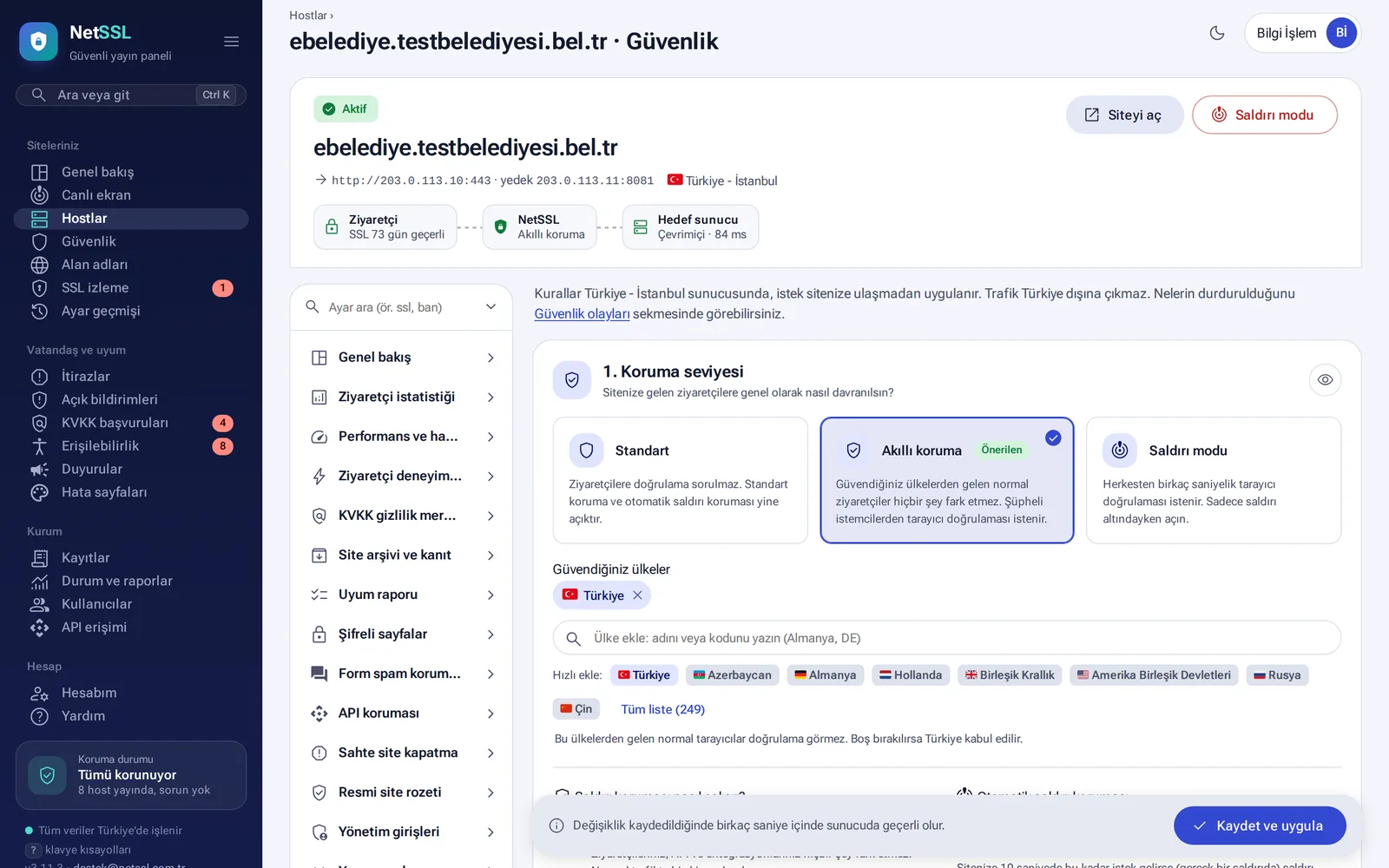
Smart protection and under-attack mode USOM malicious address list Virtual patching Test mode
Attack protection guide
Security settings: protection level and trusted countries
03 · LIVE MONITORING

Live on the Screen in Your IT Room

A full-screen view for a TV or a second monitor shows how many people are on your sites right now, attacks stopped second by second, an attack map and the status of your sites. The screen opens with a secret link that needs no login and allows viewing only.
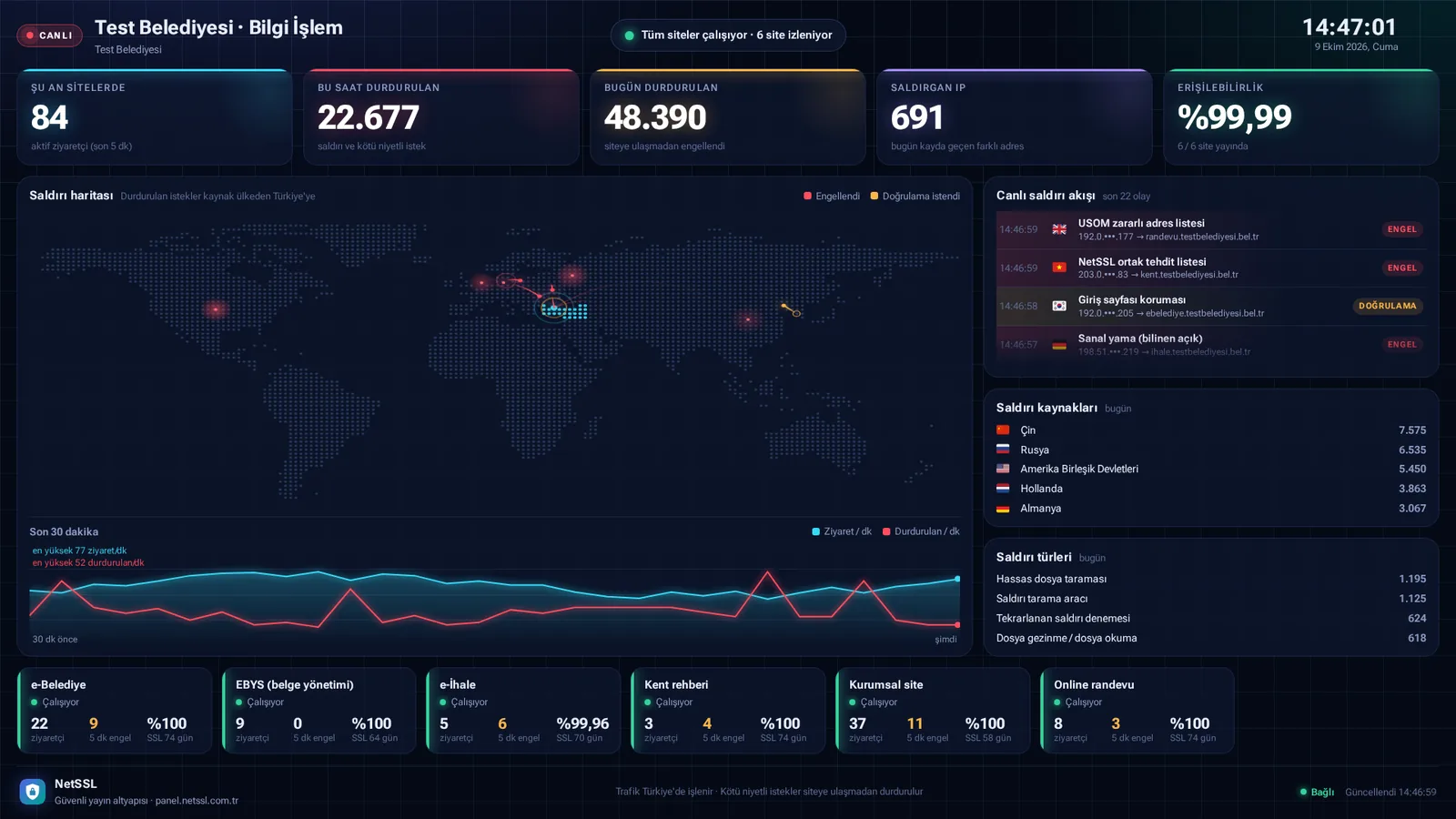
Attack map Live attack feed TV link without login Site status
Live monitoring guide
Live monitoring screen: attack map and live attack feed
04 · LAW 5651 LOGS

Every Request on Record, Sealed Every Day

Every request to your sites is logged without sampling. For municipalities and public institutions, logs are kept for 2 years. They are sealed with a timestamp every day and chained from one day to the next. For a request from a prosecutor or a court, you prepare the export with an official report in a few steps.
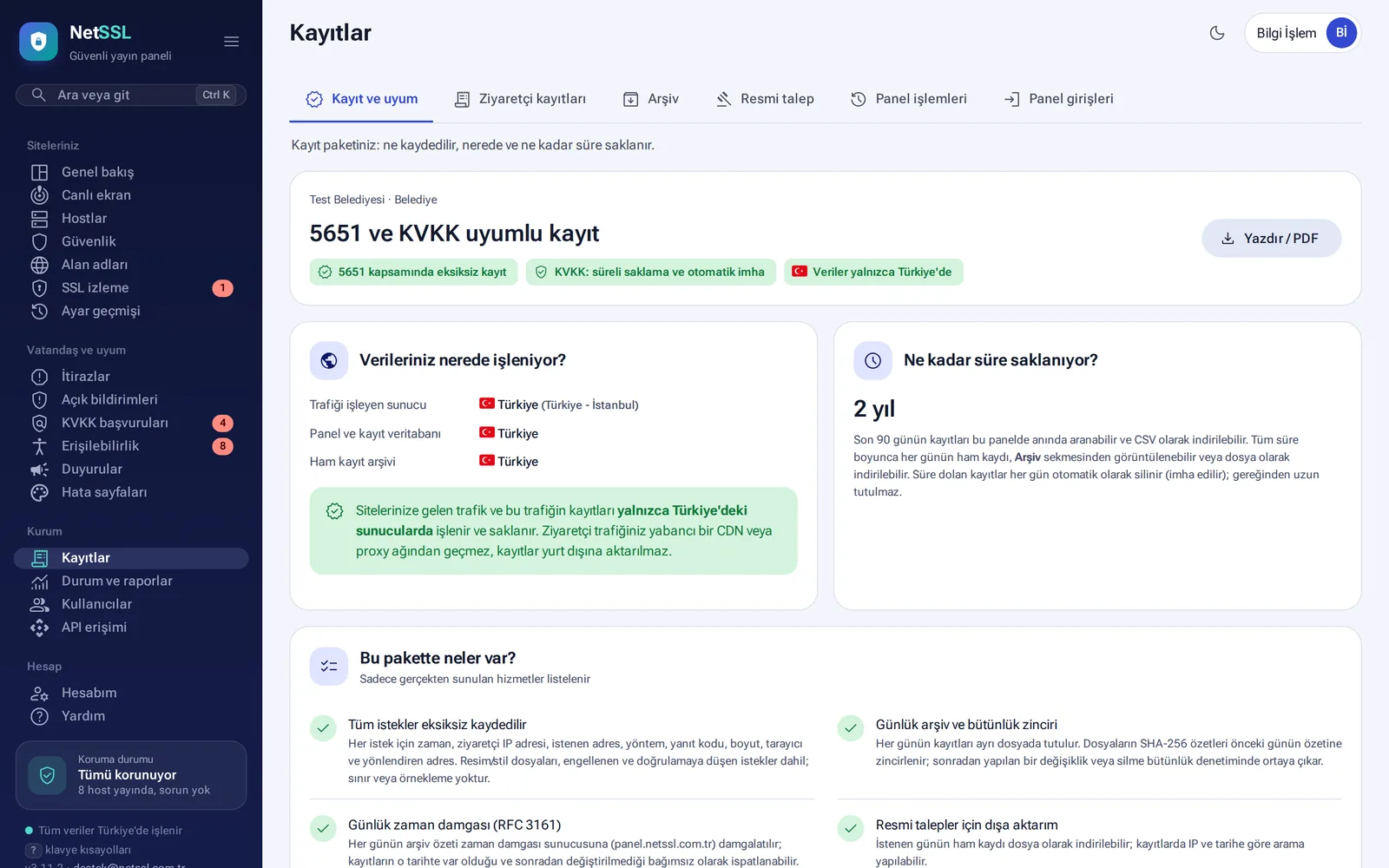
2-year retention Daily timestamp SHA-256 chain Official requests with a formal report
Law 5651 logging guide
Logs and compliance: log package, data location and retention period
05 · KVKK

Privacy Notice and Requests in One Place

The privacy notice is prepared to match your site's actual situation, and each version is kept. Citizen requests are tracked against the 30-day legal deadline. The cookie consent banner does not run tracking code until consent is given. The panel also finds which foreign services your site sends visitor data to.
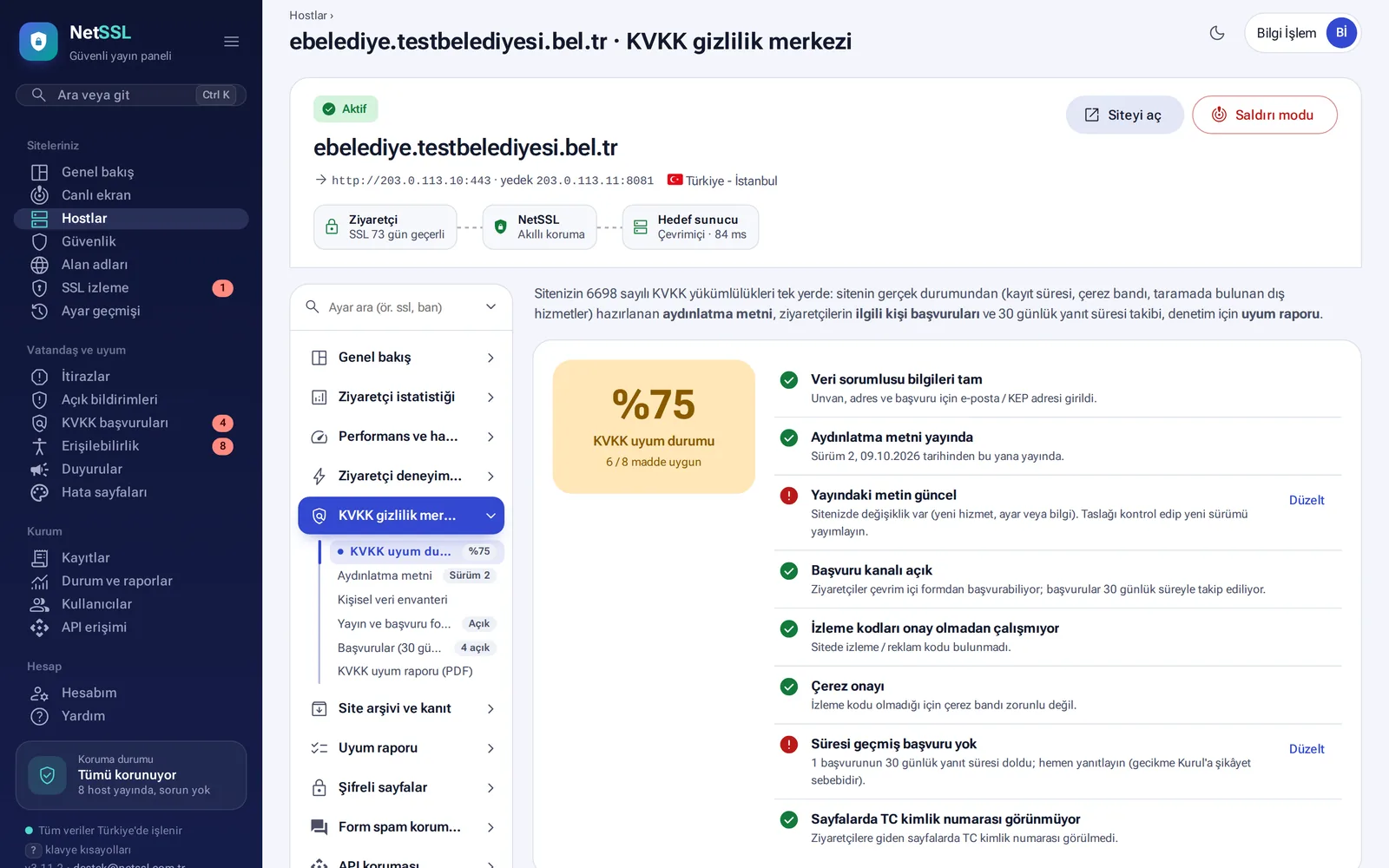
Privacy notice 30-day request tracking Cookie consent banner Scan for transfers abroad
KVKK guide
KVKK privacy center: compliance status and checklist items
06 · FAKE SITES

Citizens Verify the Official Site with One Click

The official site badge in the corner of your site opens a page that confirms the site belongs to your organization. If someone copies the badge onto a fake site, it turns into a red warning there and you are notified. The fake site takedown assistant collects the evidence and prepares the reports to send to USOM and the companies involved.
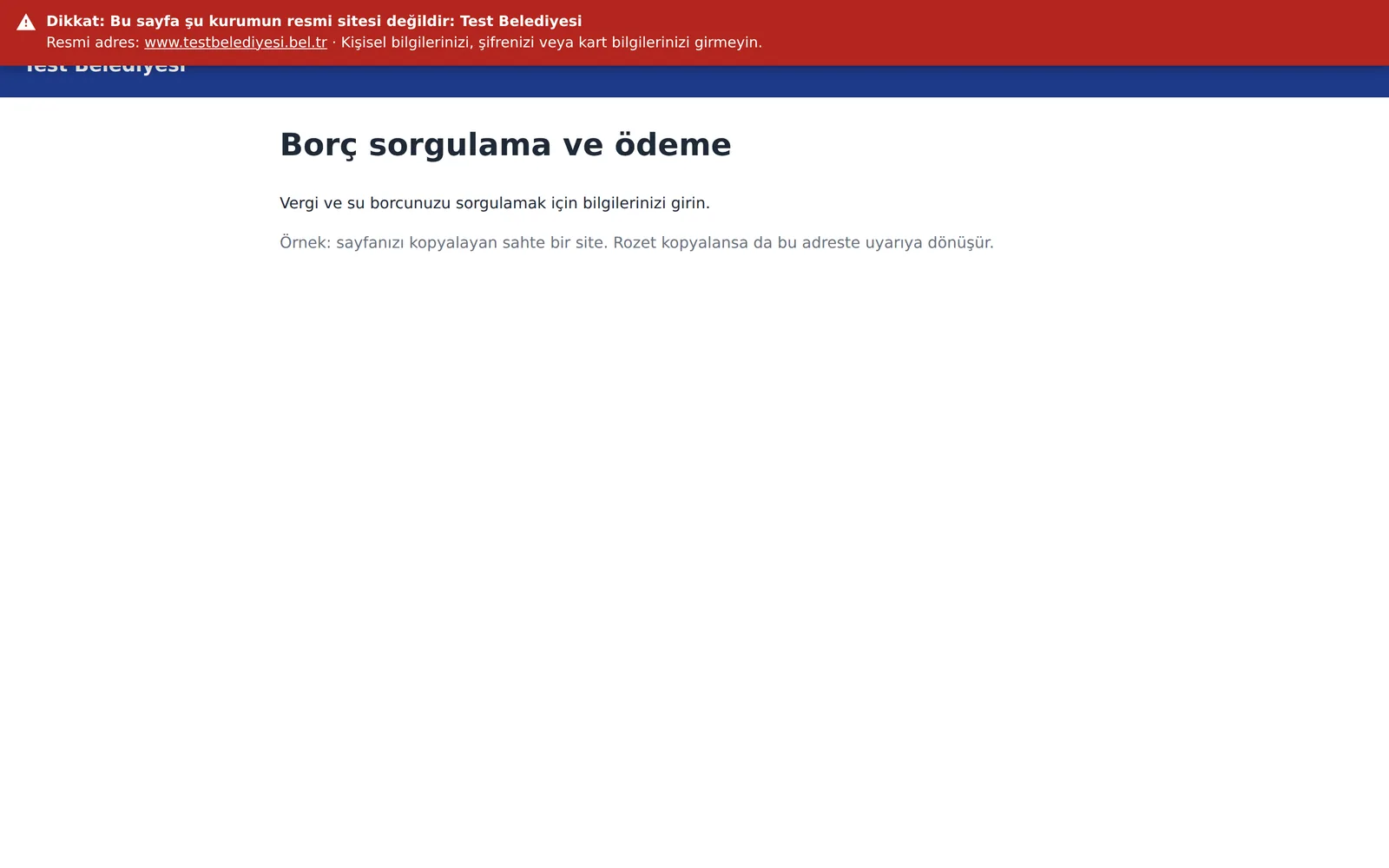
Official site badge Lookalike domain monitoring Fake site takedown assistant Alert when the badge is copied
Official site badge guide
On a fake site, the copied badge turns into a warning
07 · UNINTERRUPTED SERVICE

Online Even If the Server Crashes or the Crowds Arrive

If the main server stops responding, traffic switches to the backup server and returns once the main server recovers. The Always On feature shows visitors the last copy of the pages. For peak days such as exam results or a tax deadline, measures are scheduled in advance. During a sudden rush, visitors see a queue number instead of an error.
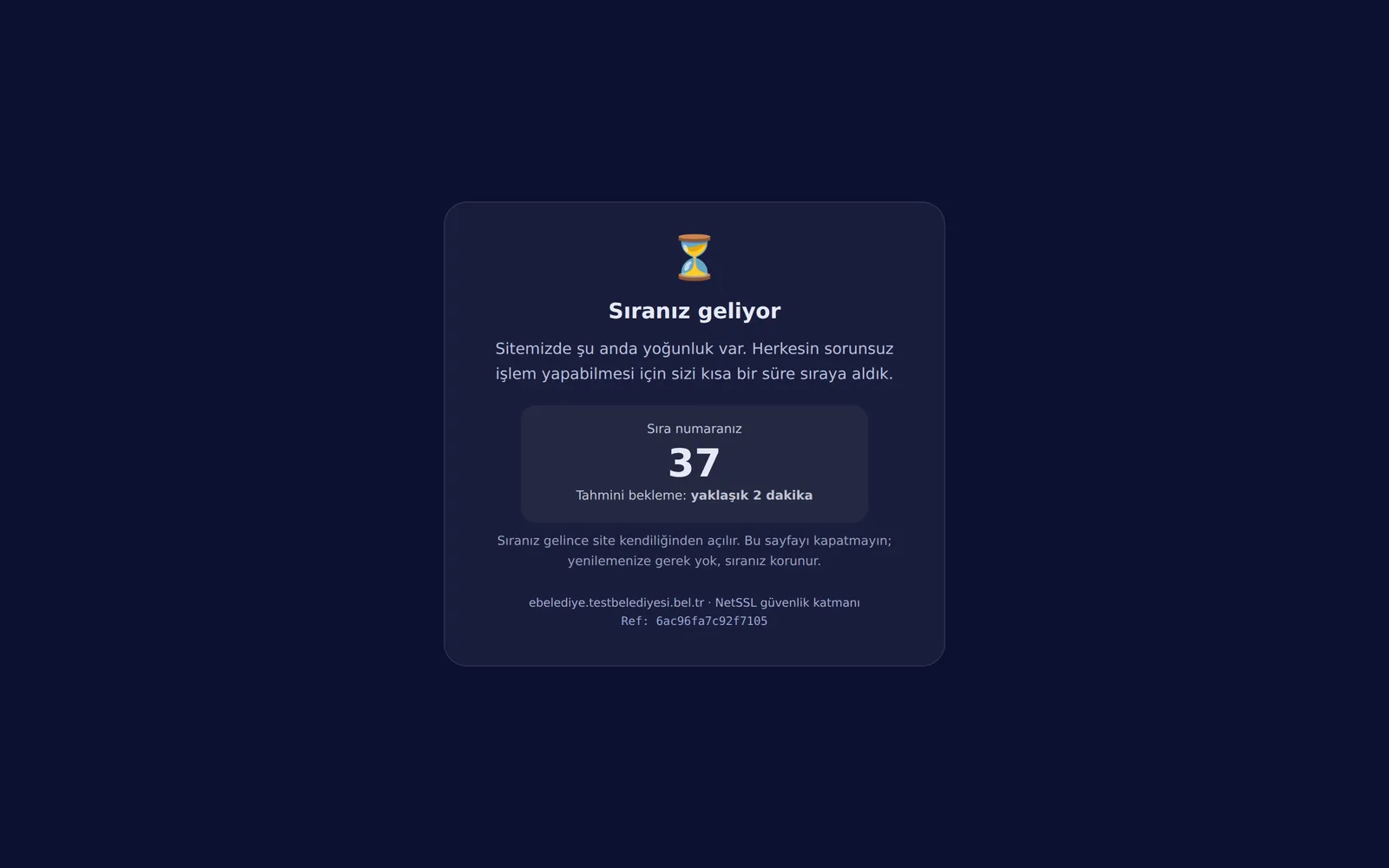
Automatic failover to a backup server Load balancing Waiting room Peak day plan
Peak days guide
Waiting room: queue number and estimated waiting time
Web Accessibility · Circular No. 2025/10

Accessibility Without Adding a Single Line of Code to Your Site

NetSSL places the accessibility toolbar on your pages itself. Your site's software is not touched, no external script is loaded and no separate license is needed.
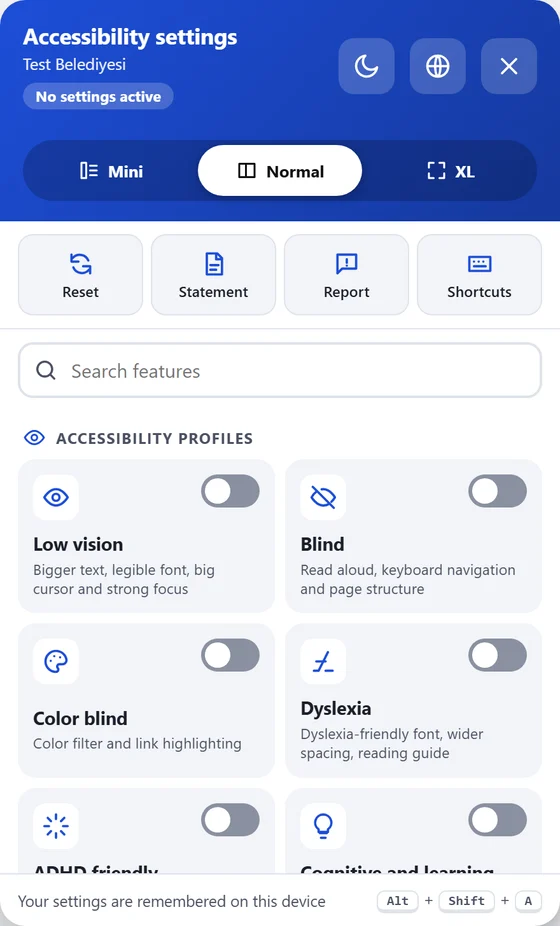
  • No code to addThe toolbar is added to pages that go through NetSSL as they are served. Your web development company has nothing to do. It works whatever platform your site is built on.
  • No external scriptsThe toolbar and its fonts come from your site's own address, through NetSSL. The visitor's browser does not connect to a foreign server, and your content security policy stays intact. The toolbar does not clash with your site's styles either.
  • Settings stay on the visitor's deviceSettings such as the chosen text size or contrast are stored only in the visitor's browser. For the panel's usage statistics, the toolbar reports only which feature was turned on, with no identifying information.
  • Read aloud runs in the browserThe page is read with the speech engine of the visitor's own browser. The text being read is never sent to any server.
  • The menu itself is accessible tooThe menu complies with WCAG 2.2. It works with a keyboard and with screen readers, and its contrast and touch targets pass automated checks. It opens in five languages and switches to right-to-left in Arabic.
  • No slowdown and no separate licenseIt is a single script and loads from the browser cache. The toolbar, the scan, the checklist and the statement are included in the NetSSL service. The toolbar takes on your organization's color and name.
Accessibility toolbar: profiles, menu size, reset, accessibility statement, report a problem and shortcuts
The toolbar as a visitor opens it on your site. It also opens with Alt + Shift + A.

9 ready-made profiles: the visitor picks a need and the site adjusts to it

Low visionBigger text, legible font, big cursor and strong focus outline
BlindRead aloud, keyboard navigation and page structure
Color blindColor filter that makes colors easier to tell apart, and link highlighting
DyslexiaDyslexia-friendly font, wider letter and line spacing, reading guide
ADHD friendlyReading mask, stops motion, softer colors
Cognitive and learningHighlights headings and links, reading guide, simpler view
Seizure safeStops flashing and moving content, softer colors, mutes sound
Keyboard and motorKeyboard navigation, strong focus, big cursor
Older adultsBig text, wider line spacing, big cursor and clear links

More than 40 settings in six groups

Text and content
Text sizePage zoomLine heightLetter spacingWord spacingText alignLegible fontDyslexia fontHighlight headingsHighlight linksText magnifierTooltipsShow image descriptions
Color and contrast
Dark contrastLight contrastHigh contrastInvert colorsMonochromeLow saturationHigh saturationProtanopia filterDeuteranopia filterTritanopia filterCustom text, heading, link and background colors
Reading and focus
Reading guideReading maskBig cursor (black or white)Strong focus outline
Calm mode
Stop animationsMute soundsHide images
Read aloud
Read pagePrevious and next sentenceSpeedVoiceRead on clickRead selection
Navigation
Keyboard navigationPage structure: headings, sections, linksReading mode
The compliance work is in the same panel tooCitizens and compliance → Accessibility
  1. Automatic scanSites are scanned against WCAG rules every week and get a score out of 100.
  2. ToolbarIt is designed in your organization's color and added to your sites with a single switch.
  3. The Ministry checklistYou fill in the 126-question Level A self-assessment in the panel.
  4. Accessibility statementIt is prepared with your compliance status, known issues and contact details.
  5. Citizen reportsProblems sent with "Report an accessibility problem" in the toolbar are answered and tracked.

The toolbar makes things easier for visitors. Problems in your site's code are fixed on your site, based on the scan results. The panel lists these problems page by page.

Web accessibility guide
All in the Same Panel

Other Features That Need No Separate Tool

Each one is explained in the Knowledge Base with screenshots.

Regulatory Compliance

What Your Organization Must Do and How the Panel Covers It

NetSSL helps you meet these obligations. Your organization remains responsible for compliance.

LegislationWhat the organization must doHow NetSSL covers it
Law No. 5651Store access logs, protect their accuracy and integrity, and hand them over on request2-year retention, daily timestamp, SHA-256 chain, integrity checks, official request export with a formal report
KVKK (Personal Data Protection Law No. 6698)Inform people about data processing, answer requests within 30 days, know where data is transferred abroadPrivacy notice, request form and deadline tracking, cookieless statistics, cookie consent banner, scan for transfers abroad
Presidential Circular No. 2025/10Websites that meet WCAG 2.2 and the Ministry checklistAccessibility toolbar, WCAG pre-scan, checklist, accessibility statement
Information and Communication Security GuideMeasures for web applications, log management, authentication and encryptionCompliance report with evidence (PDF), two-factor authentication, up-to-date TLS, security headers, attack protection
USOM / CSIRTReport cyber incidents and block malicious addressesUSOM malicious address list, incident report, SIEM export, ready-made report text for fake sites
Impact on Daily Work

Without NetSSL and with NetSSL

How do the tasks your IT team faces every day change?

TopicWithout NetSSLWith NetSSL
SSL certificateEach site has its own renewal date. If one is forgotten, the site stops opening.Certificates are obtained and renewed automatically. Wildcard SSL is installed on servers overnight.
VPN and mail certificatesYou notice only after it expires.You get a warning 30, 14 and 7 days before expiry.
AttacksThere is no protection in front of the server, or you need an expensive appliance.Attacks stop before they reach the site. The USOM list is applied automatically.
Law 5651 logsLogs are compiled by hand from server records.Logs are kept for 2 years with timestamps. An official request is ready in a few steps.
KVKK requestsRequests can get lost in an email inbox.Requests are tracked, and you are warned about the 30-day deadline.
AccessibilityYou need a separate plugin and a separate scan.The toolbar and the scan are in the same panel.
Fake sitesYou find out from citizen complaints.Lookalike domains are monitored, the badge raises a warning, and the takedown assistant prepares the report.
The IT team's morningSix different screens to check.A single list: "Needs attention".

The panel itself is protected with the same care

Two-factor authentication is mandatory for panel login. Users see only the sites they are authorized for. Critical actions such as deleting a site require an email code and, if you wish, approval from a second administrator. Traffic, logs and the panel are in our own facility in Ankara.

Mandatory two-factor authentication Sign in with a passkey Microsoft 365 / Google Workspace Access limited to your organization's network Four-eyes approval Technical support by phone
Who Is It For?

Organizations with Many Sites and a Logging Obligation

For any organization with addresses such as a corporate site, e-municipality services, appointment booking, an EDMS or e-tendering.

MunicipalitiesE-municipality, appointments, city guide, EDMS
Public InstitutionsProvincial directorates, application systems
UniversitiesMany faculty and department sites
HospitalsAppointment and patient portals
Chambers and AssociationsMember systems and announcement sites
CompaniesPortals, APIs and panels on their own servers
Knowledge Base

Every Panel Screen Explained Step by Step

In 21 guides, you can see what each screen does and how to use it, with screenshots.

Common Questions

Frequently Asked Questions About NetSSL

If you can't find what you're looking for, we're just a phone call away.

Do we need to move our site?
No. Your site stays on your own server. Only your domain's DNS record is pointed to NetSSL. You do not need to change your software, your server or your hosting company.
How long does setup take?
For one site, it takes a few minutes after the DNS record changes. The panel shows which record you need to add and checks the record itself. You can add many sites in one go with bulk add.
Do we need to do anything for the SSL certificate?
No. A certificate is obtained automatically for each site and renewed before it expires. You can also get a wildcard certificate. If you want, it is installed on your organization's servers automatically during the night.
What about the certificates of our addresses that do not go through NetSSL?
Addresses such as a VPN, a mail server or a camera recorder are added to the SSL monitoring page. The panel regularly checks each certificate's expiry date, whether it matches the name, its chain and any old TLS versions. It notifies you 30, 14 and 7 days before expiry and whenever a problem appears.
What if real visitors are blocked by mistake?
A blocked visitor sees a reference code on the screen. You search for this code in the panel, see the reason and add an exception with one click. If they wish, visitors can also send an appeal from the same page.
What is logged under Law No. 5651?
For each request, the time, the visitor's IP address, the requested address and the response details are logged. For municipalities and public institutions, logs are kept for 2 years. They are sealed with a timestamp every day and chained from one day to the next. For an official request, you search by date and IP, and the panel prepares the export together with an official report.
How does it help with KVKK, Türkiye's personal data protection law?
Visitor statistics are collected without cookies. The panel has ready-to-use tools: a privacy notice, a request form, tracking of requests against the 30-day deadline, a cookie consent banner, a scan for data transfers abroad and a warning about exposed Turkish ID numbers.
What does it do for Presidential Circular No. 2025/10?
An accessibility toolbar is added to your site without changing any code. The panel scans your sites against WCAG rules, lists the pages with problems and helps you prepare the checklist and the accessibility statement. The toolbar alone does not make a site compliant. The fixes listed in the scan results must be made on your site.
Where is our data?
Traffic, the panel, the log database and the Law 5651 archive are processed and stored in our own facility in Ankara. Traffic does not pass through a foreign CDN or proxy network, and logs are not transferred abroad.
What happens if our target server goes down?
The panel checks the target server every minute and notifies you when it stops responding. If the Always On feature is turned on, visitors see the last saved copy of the pages. If a backup server is defined, traffic switches to it and returns when the main server recovers.
Can it be used for live streaming or radio broadcasting?
No. NetSSL is for websites and web applications. We have separate services for live TV, radio and camera streams.
How is it priced?
We prepare a quote based on the number of sites and the log retention period. You can request a quote and a live demo by phone or through the contact form.

See the Panel with Your Own Sites

We will show you the panel live with sample data. If you like, we can set up your first site together on screen. The price is set by quote, based on the number of sites and the log retention period.